Features How It Works Download FAQ Türkçe Try Free
Mac & Windows · For Music Theory Learners & Teachers

Turn the Chords You Play into Notation & Symbols Instantly

The must-have tool for anyone learning music theory.

Connect your MIDI keyboard; the notes you play light up on the piano below, appear on the grand staff above, and the chord symbol and functional analysis show live. No keyboard? Play the on-screen piano.

Try Free How It Works?
3-day free trial Processed on your device Apple-signed Real grand piano sound
michord
Key: CAll devices🎹 Sound On
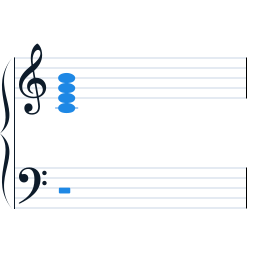
Cmaj7 chord on the grand staff — Michord screen
Cmaj7
C Major 7 · degree I (key of C) · root position
C E G B
Fits: C · Em · G · Am
Michord piano keyboard — chord tones colored by role
Root 3rd 5th 7th
Michord's actual screen — the notes you play become notation, chords and analysis.

Makes Theory Visible on Screen

Michord is built to make learning and teaching easier — in the classroom and the studio, everything you play becomes readable at a glance.

🎹

Live MIDI Input

Connect your keyboard via Web MIDI and use several devices at once. Every note appears on screen instantly, with zero latency.

🎼

Grand Staff Notation

Treble and bass clef; automatic split around middle C, correct enharmonic spelling. Clean notation powered by VexFlow.

🎯

Full Chord Engine

Triads, 6/7/9/11/13ths, sus/add/altered/dim/aug, inversions and slash chords — up to 6 notes, with alternate interpretations.

🧭

Functional Analysis

See the chord's scale degree and Roman-numeral analysis live. Show students the "why" behind every chord.

🔊

Real Piano Sound

Salamander Grand Piano (Yamaha C5) samples in an offline, bundled sampler. Toggle it on or off anytime.

🔒

Local & Private

Note recognition, the chord engine and piano sound run locally on your computer; your music is never uploaded. Works offline after you sign in.

Get Started in Three Steps

Download & Sign In

Download the Mac or Windows version and install. Sign in with your email — try free for 3 days, no credit card.

Connect Your Keyboard

Plug in your USB or Bluetooth MIDI keyboard. No keyboard? Play the on-screen piano with your mouse.

Play & See

Watch the notes you play turn into notation, chords and analysis — in class, in the practice room, in the studio.

Try Free for 3 Days

For Apple Silicon Mac and Windows. Sign in with your email and try for 3 days — no credit card.

macOS

Apple Silicon (M1/M2/M3…) · .dmg
Download for Mac

Windows

Windows 10 and later · .exe
Coming soon

After the trial:

$2.99 / mo $14.99 / yr · best value

Cancel anytime.

Frequently Asked Questions

Do I need a MIDI keyboard?

No. If you have one, you can play live; otherwise click the on-screen piano or play with your computer keyboard (A W S E D F… keys, Z/X for octave) to build chords and see their notation and symbols.

Which chords does it recognize?

From triads to 13ths; sus, add, altered, dim, aug; 1st/2nd/3rd inversions and slash chords, up to 6 notes — with alternate interpretations.

Is it paid? How much?

First 3 days free (no credit card). After that, $2.99/month or $14.99/year. Cancel anytime.

Do I need an internet connection?

Only for sign-in and subscription checks. Note recognition, the chord engine and piano sound run locally on your computer; your music is never sent to the cloud. You can keep using it offline after signing in.

What if macOS says "unidentified developer"?

The app is signed with an Apple Developer ID. If you see a warning on first launch, right-click the app and choose "Open".

When is the Windows version coming?

The Windows version is in the works. You'll be able to download it here when it's ready.

Make Theory Heard and Seen

Connect your MIDI keyboard, play, and see. Michord handles the rest.

Try Free
